

Or, dive right into the content and create your own schedule:
Social Media Templates
This Is a 16:9 Moment (Reel)

🎯 How To
-
Open and Customize the template: This Is a 16:9 Moment (Reel)
-
Customize the Reel with a wide cinematic video shot of the home. This works best when the feature is strong enough to deserve the full wide-angle treatment, like a backyard, living room, kitchen, pool area, view, great room, or outdoor entertaining space.
-
Add your 16:9 horizontal video clip inside the vertical frame. You can tilt or rotate the clip slightly, similar to the inspiration, or simply place the wide cinematic shot inside the Reel frame
-
For the main text above, replace the placeholder depending on the wide shot you will be using. For example: pool, backyard, living room, kitchen, view, great room, patio, or outdoor entertaining space. Keep the open house details lower on the screen and update them with the correct listing information.
-
-
Download slides from Canva and upload to social.
-
Download the slide from your Canva template as an MP4 video.
-
Upload on Instagram, Facebook, LinkedIn, or wherever you are most active.
-
-
Copy and paste the CAPTION below (edit as needed!).
-
Some spaces deserve the wide angle.
Come see it in person!
-
-
Publish on social.
National Ice Cream Day in [City] (Carousel)

🎯 How To
-
Open and Customize the template: National Ice Cream Day in [City] (Carousel)
-
Customize the cover page by replacing [City] with your city, town, neighborhood, or local market. Add your logo in the placeholder on each slide if you want the carousel to feel more branded.
-
On Slides 2–4, replace each [Ice Cream Shop] placeholder with a real local spot you recommend. Add your go-to order and a quick reason why you like it.
-
Swap the photos with ice cream shots, storefront photos, local street views, or your own photo from the shop. This works best when it feels personal, not like a generic list pulled from Google.
-
On the following pages, you will notice there are different size options depending on how you want to use the template, whether you are posting it as a carousel, using it as a reel, or posting it on TikTok.
-
-
Download slides from Canva and upload to social.
-
Download the slides from your Canva template as a PNG or JPEG file.
-
Upload on Instagram, Facebook, LinkedIn, or wherever you are most active.
-
-
Copy and paste the CAPTION below (edit as needed!).
-
Did I get it right, or do you have a better local pick?
-
-
Publish on social.
Breaking News: Agent Cancels Open House (Carousel)

🎯 How To
-
Open and Customize the template: Breaking News: Agent Cancels Open House (Carousel)
-
customize the cover page with your own photo or the image style you want to use for the mugshot/breaking-news look.
On the cover pages, we added the ChatGPT prompts inside the Canva notes section. Each cover size has a different prompt, so copy the prompt from the notes section that matches the size you want to use. Then upload your photo to ChatGPT, paste the prompt, and generate the breaking-news style image.
-
On Slide 2, update the time, day, and wording based on your home open house schedule. On Slide 3, add the home property address (This slide is optional. Remove it if you do not want to include the address or if you prefer to keep the location more general with just the neighborhood.)
-
On the following pages, you will notice there are different size options depending on how you want to use the template, whether you are posting it as a carousel, using it as a reel, or posting it on TikTok.
-
-
Download slides from Canva and upload to social.
-
Download the slides from your Canva template as a PNG or JPEG file.
-
Upload on Instagram, Facebook, LinkedIn, or wherever you are most active.
-
-
Copy and paste the CAPTION below (edit as needed!).
-
Traditional open house promos don’t work on Instagram anymore so you do what you gotta do. See you Sunday… unless you’ve contracted the stomach virus..
-
-
Publish on social.
Drive by the House (Reel)

🎯 How To
-
Open and Customize the template: Drive by the House (Reel)
-
Customize the Reel and add a casual video shot from inside your car while driving through a neighborhood or past a home.
-
You can adjust the times based on what makes sense in your market. The point is to show buyers that a neighborhood can feel very different in the morning, during school pickup, after work, or later at night.
-
Download the slide from your Canva template as an MP4 video. Add audio or trending audio directly from Instagram or TikTok before posting to make the Reel feel more native and engaging.
-
-
Download slides from Canva and upload to social.
-
Download the slide from your Canva template as an MP4 video.
-
Upload on Instagram, Facebook, LinkedIn, or wherever you are most active.
-
-
Copy and paste the CAPTION below (edit as needed!).
-
A showing tells you about the house.
A drive-by tells you about the life around it.
-
-
Publish on social.
Inspiration: @ripa.theniqabirealtor
Where to Watch the World Cup Final (Carousel)

🎯 How To
-
Open and Customize the template: Where to Watch the World Cup Final (Carousel)
-
Customize the cover page by replacing [City] with your city, town, neighborhood, or local area. Add your logo in the placeholder on the cover so the post feels branded and connected to you.
-
On Slide 2, update the Argentina fan recommendations with real places in your market. Add bars, restaurants, watch parties, breweries, sports pubs, or community spots where Argentina fans are likely to gather.
-
On Slide 3, update the France fan recommendations the same way. Add the places where France fans, soccer fans, or international crowds are likely to watch the match.
-
On the following pages, you will notice there are different size options depending on how you want to use the template, whether you are posting it as a carousel, using it as a reel, or posting it on TikTok.
-
-
Download slides from Canva and upload to social.
-
Download the slides from your Canva template as a PNG or JPEG file.
-
Upload on Instagram, Facebook, LinkedIn, or wherever you are most active.
-
-
Copy and paste the CAPTION below (edit as needed!).
-
If you’re an [Argentina/France] fan and want to be surrounded by other [Argentina/France] fans here in [Market], here are some spots you can go to this Sunday.
-
-
Publish on social.
Hyperlocal/Business Breaking News Template
🎯 How To
-
Open and Customize the template: Hyperlocal/Business Breaking News Template
-
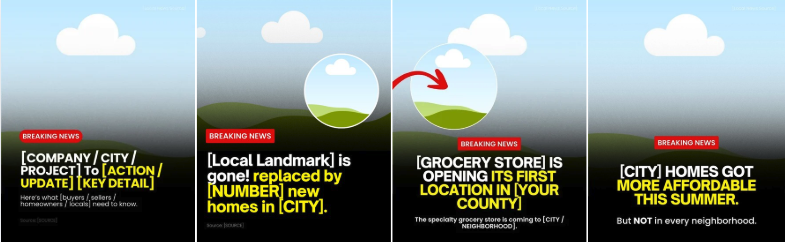
We have provided template options you can use, either for a new business opening in your local area or for a local development update.
-
Be sure to update all necessary placeholders like the [CITY], [NEIGHBORHOOD], [BUSINESS NAME], [SOURCE], [PROJECT NAME], and any other local details so the post feels accurate, relevant, and specific to your market.
-
For the visual, use a local image, storefront rendering, business logo if allowed, map screenshot, or a generic illustrated placeholder in the circle.
-
On the following pages, you will notice there are different size options depending on how you want to use the template, whether you are posting it as a carousel, using it as a reel, or posting it on TikTok.
-
-
Download slides from Canva and upload to social.
-
Download the slides from your Canva template as a PNG or JPEG file.
-
Upload on Instagram, Facebook, LinkedIn, or wherever you are most active.
-
-
Publish on social.
National Drive Through Day (Hyperlocal) – July 24

🎯 How To
-
Open and Customize the template: National Drive Through Day (Hyperlocal)
-
Customize the main copy with your favorite local drive-through, restaurant, coffee stand, burger spot, taco shop, or quick stop in your market. Add your logo in the placeholder so the post feels branded and connected to you.
-
Swap [DRIVE-THROUGH / RESTAURANT] with your pick and replace [CITY] with your city, town, neighborhood, or market.
-
Add one of your favorites or personal favorite items in the small photo placeholder. This could be your favorite snack, drink, coffee order, burger, fries, breakfast sandwich, smoothie, taco, or whatever people should try when they go.
-
On the following pages, you will notice there are different size options depending on how you want to use the template, whether you are posting it as a carousel, using it as a reel, or posting it on TikTok.
-
-
Download slides from Canva and upload to social.
-
Download the slides from your Canva template as a PNG or JPEG file.
-
Upload on Instagram, Facebook, LinkedIn, or wherever you are most active.
-
-
Copy and paste the CAPTION below (edit as needed!).
-
Do you agree or am I about to start a local fight?
-
-
Publish on social.
Video Scripts
📹 VIDEO SCRIPT 1: The Best Drive-Thrus in [CITY/TOWN NAME]
🎯 How To
-
Copy and paste the example video script below in your preferred working doc.
-
Edit everything in [BRACKETS] for your market and audience.
-
Record the video and post on social.
HOOK:
Friday is National Drive-Thru Day.
Yes, that’s a real holiday.
And no, I’m not talking about the big chains.
[CITY/TOWN NAME] has a local drive-thru game most people don’t even know about.
BODY:
[COFFEE DRIVE-THRU, the local kiosk or coffee shack, not a chain]
[ONE SPECIFIC DETAIL, e.g. they know half the town’s orders by heart]
When the person at the window knows your name, that’s not a small thing.
Stop two, the food.
[FOOD DRIVE-THRU, the burger stand, taco window, or BBQ spot locals swear by]
[ONE SPECIFIC DETAIL, e.g. cash only, worth it, get the double]
Out-of-towners drive right past this one.
Their loss.
And the third one, this is the one I always end up at.
[WILDCARD DRIVE-THRU, the unexpected one, a dairy barn, snowball stand, farm stand, or late-night window]
[ONE SPECIFIC DETAIL, e.g. they’ll set a gallon of sweet tea right in your back seat]
Nobody can explain this place until you live here.
CTA:
Comment your favorite drive-thru down below!
📹 VIDEO SCRIPT 2: Local Eye Opener
🎯 How To
-
Copy and paste the example video script below in your preferred working doc.
-
Edit everything in [BRACKETS] for your market and audience.
-
Record the video and post on social.
HOOK:
Most people don’t realize how much is happening right outside their future front door in [CITY/TOWN NAME]. And when you’re buying a home, that ends up mattering way more than you’d think.
BODY:
Here’s the thing about [CITY/TOWN NAME].
It’s not just a place to live. There’s a whole life already built into it.
When you’re weighing neighborhoods, the local scene is one of those invisible factors nobody puts on their checklist.
Just look at a normal weekend around here.
[RECURRING EVENT ONE, e.g. the Saturday farmers market or monthly art walk]
[RECURRING EVENT TWO, e.g. the summer concert series, brewery nights, food truck rallies]
[RECURRING EVENT THREE, e.g. the free family stuff, movies in the park, seasonal festivals]
Something is always going on. That’s not an accident. That’s the town.
And for first-time buyers especially, this is huge.
Because you’re not just buying a house. You’re buying into a community.
And the community has to actually feel alive.
Here’s what I tell every buyer I work with.
The neighborhoods where there’s always something happening are the ones people fight to stay in.
And over time, that shows up in what homes are worth.
So find the neighborhood that fits your lifestyle, not just your budget.
That’s the part you’ll still care about ten years from now.
CTA:
Send this to someone who’s considering [CITY/TOWN NAME].
🎯 How To
-
Copy and paste the email script below in your preferred working doc.
-
Be prepared to reach out to anyone who responds.
-
Personalize the sign-off and send to buyers and renters in your database.
Sources: Realtor.com, U.S. News
Subject: The number most first-time buyers forget about
Body of email:
Hi [First Name],
Most buyers I talk to are locked in on the down payment. That’s smart.
But there are a handful of other costs that show up right around closing and are rarely mentioned. If unexpected, they can add real stress to what should be an exciting moment.
This can include costs like:
-
Lease overlap
-
Storage fees
-
Moving expenses
-
Random new home purchases (like new locks or lawn equipment)
-
Financial cushion
Worth looking at all of this if you’re thinking about making a move in the next six, twelve, or twenty-four months.
If anything in that list raises questions, I’m happy to walk through your specific situation. Would a quick 15-minute call this week or next work for you?”
Best,
[Your Name]
Blog
🎯 How To
-
Copy and paste the blog below into your preferred working doc.
-
Replace everything in [BRACKETS] with your local info. Adjust the tone as needed to match your brand.
-
⬇️ Download the BLOG IMAGE HERE (3 options)
-
Upload to your website (meta description, keywords and title options included below).
Sources: Realtor.com, U.S. News
Meta Description: Learn the costs that come with buying your first home, from moving expenses and lease timing to closing costs and homeownership essentials.
Keywords: renting to buying a home, first-time homebuyer, first-time home buyer costs, hidden costs of buying a home, home buying budget, budgeting for a home purchase, moving from renting to owning, first-time buyer tips, homeownership costs, renters buying a home, cost of buying a house, home buying checklist, home buying expenses
Title ideas:
-
The Real Cost of Moving From Renting to Buying a Home: What to Budget for Beyond the Down Payment
-
Renting to Buying: A Complete Guide to Budgeting for Your First Home
-
6 Costs Renters Should Budget for Before Buying a Home
Most renters who are preparing to buy their first home know they’ll need a down payment and closing costs. They research mortgage payments, compare interest rates, and carefully calculate what they can afford each month.
But that’s only part of the picture.
The move from renting to homeownership comes with several expenses that are easy to overlook, and if you don’t plan for them, they can add unnecessary stress to an exciting milestone.
The good news? Most of these costs are predictable. With a little planning, you can build them into your budget and avoid last-minute surprises.
Here’s what every renter should consider before making the move to homeownership.
1. The Upfront Costs of Buying a Home
Before you even get the keys, there are several one-time expenses that come with purchasing a home.
Depending on your loan and the property you’re buying, those may include:
-
Your down payment
-
Earnest money deposit
-
Home inspection
-
Appraisal
-
Closing costs
These are the costs most buyers expect because they’re discussed throughout the homebuying process. Your lender and real estate agent will help you understand what to expect based on your specific purchase.
2. Don’t Forget About Your Lease
One of the biggest budgeting mistakes first-time buyers make has nothing to do with buying a home. It’s forgetting about the lease they’re leaving behind.
Before you start shopping, take a close look at your lease agreement.
Ask yourself:
-
How much notice do I have to give?
-
Is there an early termination fee?
-
Can I move to a month-to-month lease if needed?
-
Will I receive my security deposit back?
Every landlord has different policies, and understanding yours early can help you avoid unexpected costs later.
3. Budget for Moving Expenses
Moving is one of those expenses that’s easy to underestimate because it’s made up of lots of smaller costs.
Depending on your situation, you may need to budget for:
-
Professional movers or a moving truck
-
Boxes and packing supplies
-
Utility transfers and connection fees
-
Cleaning services
-
Storage
-
Time away from work
Even if you’re moving locally, these expenses can add up quickly. Building them into your budget ahead of time can make moving day much less stressful.
4. Your Lease and Closing Date May Not Line Up
Many buyers assume they’ll simply move out of their rental and into their new home on the same day.
Sometimes that happens. Sometimes it doesn’t.
A closing can be delayed for reasons that are completely outside your control, including appraisal scheduling, underwriting, title work, repairs, or insurance requirements.
If your lease ends before your closing, you may find yourself paying for:
-
Month-to-month rent
-
A short-term rental
-
A storage unit
-
Two separate moves
The good news is that there are often ways to minimize these costs.
Some landlords are willing to offer a short-term extension, and in some transactions, buyers and sellers can negotiate a rent-back agreement that gives everyone a little more flexibility. While these options aren’t available in every situation, they’re worth discussing with your real estate agent early in the process.
5. Plan for the First Few Weeks in Your New Home
Many new homeowners are surprised by how many small purchases happen during the first month.
You may need things like:
-
Window coverings
-
Paint and supplies
-
Lawn equipment
-
Basic tools
-
New locks
-
Cleaning supplies
-
Furniture or shelving
None of these purchases may be particularly expensive on their own, but together they can have a noticeable impact on your budget.
6. Leave Yourself a Financial Cushion
One of the best pieces of advice I give buyers is simple: don’t spend every dollar you have at closing.
Owning a home means you’re now responsible for repairs and maintenance, and those expenses don’t always wait until it’s convenient.
Whether it’s a water heater, an appliance, or an unexpected repair, having some money set aside after closing can provide valuable peace of mind as you settle into your new home.
How to Prepare for a Smooth Transition
A little planning goes a long way. Before you buy, make sure you:
-
Review your lease and understand your notice requirements.
-
Ask your landlord about extension or month-to-month options if your timing changes.
-
Budget for moving expenses, not just your down payment.
-
Leave room in your budget for the first few weeks of homeownership.
-
Keep an emergency cushion after closing whenever possible.
-
Work with a lender and real estate agent who understand your timeline and can help you plan ahead.
Buying a Home Should Be Exciting, Not Full of Surprises
Buying your first home is one of life’s biggest milestones, and careful planning can make the experience much smoother.
While most buyers focus on saving for the down payment, it’s often the smaller, overlooked expenses that create the biggest headaches. Understanding them ahead of time allows you to make confident decisions and enjoy the transition from renting to homeownership.