

National Book Lovers Day kicks off the week on Sunday. You’ve got a full lineup of engagement content, a homebuying thread, hyperlocal history, and a listing presentation Role Play on Tuesday. Let’s get into it!
Or dive in below:
Social Media Templates
- National Book Lovers Day in [Market]
- Here Are My Recent Flops
- The Full Homebuying Thread [Tweet Style]
- Hyperlocal/Business Breaking News Template
- Important Events in [Market] History Trend
Video Scripts
- Where to Spend Book Lovers Day in [CITY/TOWN NAME]
- 2027 Colormix Trend Forecast
- 5 Questions Before You Look at a Home
Blog
-
- What to Expect When Buying a Home
Social Media Templates
National Book Lovers Day in [Market] (Carousel)

🎯 How To
-
Open and Customize the template: National Book Lovers Day in [Market] (Carousel)
-
Customize the cover page by replacing [Market] with your city, town, neighborhood, or local area. Add your logo, name, or handle in the placeholders if the template includes them. We’ve added a few cover options for you to choose from.
-
Swap the cover visual with a cozy bookstore photo, book stack, shelf detail, storefront, downtown street, reading nook, or simple text-based graphic. Or use the current photo as is.
-
Replace each bookstore placeholder with real local bookstores you recommend. Add a short reason why each one is worth visiting.You can add more entries if you have multiple listing photos that work, or post it as a single post if you only want to feature one strong image.
-
On the following pages, you will notice there are different size options depending on how you want to use the template, whether you are posting it as a carousel, using it as a reel, or posting it on TikTok.
-
-
Download slides from Canva and upload to social.
-
Download the slides from your Canva template as a PNG or JPEG file.
-
Upload on Instagram, Facebook, LinkedIn, or wherever you are most active.
-
-
Copy and paste the CAPTION below (edit as needed!).
-
If you’re a reader like me here are some of my local go-tos.
-
-
Publish on social.
Here Are My Recent Flops (Carousel)

🎯 How To
-
Open and Customize the template: Here Are My Recent Flops (Carousel)
-
Customize each slide with your own recent “flops” from real estate, life, or both.
-
Swap the cover with a candid, slightly chaotic photo. This could be your car full of signs, your messy desk, your coffee situation, your trunk, your lockbox pile, or any behind-the-scenes agent photo that feels real.
-
Customize the personal slides so they match your real life. You can swap diet/workout references for coffee addiction, calendar chaos, forgetting lunch, overcommitting, buying too many Amazon “business tools,” or whatever feels true to you.
-
On the following pages, you will notice there are different size options depending on how you want to use the template, whether you are posting it as a carousel, using it as a reel, or posting it on TikTok.
-
-
Download slides from Canva and upload to social.
-
Download the slides from your Canva template as a PNG or JPEG file.
-
Upload on Instagram, Facebook, LinkedIn, or wherever you are most active.
-
-
Copy and paste the CAPTION below (edit as needed!).
-
Time to switch it up a little. You’ve seen my happy closings and beautiful listing videos but you haven’t seen all the fails.
-
-
Publish on social.
Inspiration: @pritchard_jess
The Full Homebuying Thread [Tweet Style] (Carousel)

🎯 How To
-
Open and Customize the template: The Full Homebuying Thread [Tweet Style] (Carousel)
-
Customize each slide with your name, handle, and profile photo. This carousel should feel like a tweet-style thread, so keep the design clean, text-focused, and easy to read.
-
On the following pages, you will notice there are different size options depending on how you want to use the template, whether you are posting it as a carousel, using it as a reel, or posting it on TikTok.
-
-
Download slides from Canva and upload to social.
-
Download the slides from your Canva template as a PNG or JPEG file.
-
Upload on Instagram, Facebook, LinkedIn, or wherever you are most active.
-
-
Copy and paste the CAPTION below (edit as needed!).
-
Quick playbook to help you begin your home search. If this doesn’t apply to you right now, save it, because it will and this will help you at the beginning.
-
-
Publish on social.
Hyperlocal/Business Breaking News Template (Static Post)
🎯 How To
-
Open and Customize the template: Hyperlocal/Business Breaking News Template (Static Post)
-
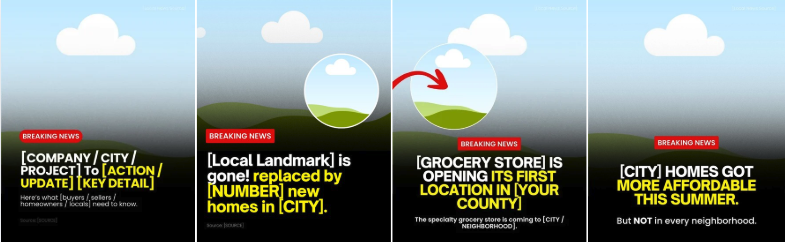
We have provided template options you can use, either for a new business opening in your local area or for a local development update.
-
Be sure to update all necessary placeholders like the [CITY], [NEIGHBORHOOD], [BUSINESS NAME], [SOURCE], [PROJECT NAME], and any other local details so the post feels accurate, relevant, and specific to your market.
-
For the visual, use a local image, storefront rendering, business logo if allowed, map screenshot, or a generic illustrated placeholder in the circle.
-
If you’re not sure what local updates to feature, BAMx members can use Hyperlocal Content AI Tool at hyperlocalcontent.ai to find local projects, new stores opening, development updates, and other market-specific stories worth posting about. Try it while customizing this template so you’re not guessing what to share.
-
On the following pages, you will notice there are different size options depending on how you want to use the template, whether you are posting it as a carousel, using it as a reel, or posting it on TikTok.
-
-
Download slides from Canva and upload to social.
-
Download the slides from your Canva template as a PNG or JPEG file.
-
Upload on Instagram, Facebook, LinkedIn, or wherever you are most active.
-
-
Publish on social.
Important Events in [Market] History Trend (Carousel)
![Important Events in [Market] History Trend (Carousel) - 08-07-26.jpg](https://assets.skool.com/f/99bafab03f014d90b0792504967a8ea5/0185423614e2418b9c6a1d0841edc9b2cce92fd0418c4ee28ccfefae05493e48.jpg "Important Events in [Market] History Trend (Carousel) - 08-07-26.jpg")
🎯 How To
-
Open and Customize the template: Important Events in [Market] History Trend (Carousel)
-
Customize the timeline graphic by replacing [Market] with your city, town, neighborhood, or local area.
-
Update the timeline with a mix of real local history and your upcoming open house. Add one or two notable local events, landmarks, openings, anniversaries, or “only locals know” moments, then end the timeline with your weekend open house.
-
For the local history entries, you can use things like when a landmark opened, when the town was founded, when a popular local restaurant opened, when a historic building was built, when a local team won something, or when a major community event started.
-
On the following pages, you will notice there are different size options depending on how you want to use the template, whether you are posting it as a carousel, using it as a reel, or posting it on TikTok.
-
-
Download slides from Canva and upload to social.
-
Download the slides from your Canva template as a PNG or JPEG file.
-
Upload on Instagram, Facebook, LinkedIn, or wherever you are most active.
-
-
Copy and paste the CAPTION below (edit as needed!).
-
[Address] | [Time] | come see it before someone else does
-
-
Publish on social.
Inspiration: Spritz
Video Scripts
📹 VIDEO SCRIPT 1: Where to Spend Book Lovers Day in [CITY/TOWN NAME]
🎯 How To
-
Copy and paste the example video script below in your preferred working doc.
-
Edit everything in [BRACKETS] for your market and audience.
-
Record the video and post on social.
Note: National Book Lovers Day is August 9th, but this can be posted any time.
HOOK:
National Book Lovers Day is coming up.
Here are three spots in [CITY/TOWN NAME] are worth it whether you read twelve books a year or zero.
BODY:
First, the book itself.
[BOOKSTORE OR LIBRARY, your local indie shop, or the library if that’s the heart of your town]
[ONE SPECIFIC DETAIL, e.g. the staff picks shelf has never once steered me wrong]
Go in without a plan, and leave with something you never would have searched for.
Second, somewhere to actually sit and read.
[COFFEE SHOP OR CAFE, the one that won’t rush you out]
[ONE SPECIFIC DETAIL, e.g. I’ve held a table there for three hours on one coffee and nobody said a word]
That’s my entire criteria, honestly.
Can you overstay and get away with it?
And the third one. This is where I actually end up.
[OUTDOOR SPOT, your park bench, waterfront, shaded trail, or patio worth sitting on]
[ONE SPECIFIC DETAIL, e.g. late afternoon, back corner, nobody bothers you out there]
I’ve fallen asleep there more than once. Book on my face. Not proud of it.
But that’s the review.
CTA:
Send this to your favorite book lover.
📹 VIDEO SCRIPT 2: 2027 Colormix Trend Forecast
🎯 How To
-
Copy and paste the example video script below in your preferred working doc.
-
Edit as needed for your market and audience.
-
Record the video and post on social.
Source: Sherwin-Williams
HOOK:
If you’re painting anything in the next year, watch this before you pick a color.
BODY:
Okay, so Sherwin-Williams does this every year.
They put out a forecast for what’s coming.
This one’s for 2027, they’re calling it Rewild, forty-eight colors total.
They split it into three moods.
One’s heritage. Warm, old, looks like it’s been there a hundred years.
One’s the loud one. Bold, high contrast, basically no rules.
And one leans into nature. Earthy, natural, tied to wherever you actually live.
Pick whichever sounds like you. That’s genuinely the point of it.
But that’s not the part that got me.
Buried in the same announcement, brand new this year, they added ten shades they’re calling Continuity Colors.
Their words, these transcend trends. Still going to work years from now.
Stuff like White Duck. Red Barn. Clove. Celery.
Nothing flashy about any of them. That’s the whole idea.
So sit with what just happened there.
A paint company released a trend forecast.
And then flagged which colors are not a trend.
And here’s the kicker.
Universal Khaki was their Color of the Year for 2026. Last year.
It made the 2027 forecast.
It did not make the timeless list.
That’s the lesson if you ever plan on selling.
Trend colors go on things you can undo in an afternoon.
Front door. Kitchen island. Powder room.
Cabinets, your whole main floor, the expensive stuff? That’s where safe pays you back.
And if you want to see any of them in person, they’ll mail you the chips for free. Costs you nothing to be sure.
I’m in houses around [CITY/TOWN NAME] every week.
[ONE LOCAL OBSERVATION, e.g. the ones that sit longest are almost always painted for a trend from three years ago]
Never once watched a deal die because a color was too safe.
CTA:
What’s your favorite paint color right now?
🎯 How To
-
Copy and paste the email script below in your preferred working doc.
-
Edit as needed for your market.
-
Be prepared to reply to anyone who responds.
-
Personalize the sign-off and send to prospective buyers in your database.
Subject: Before you look at a single home…do this
Body of email:
Hey [First Name],
The home search starts with five questions. The problem is, most buyers never get asked these.
Before you start looking at homes, get clear on these five things:
-
What’s driving your move?
-
What are your non-negotiables, and what can you live without?
-
Better home or better location, which matters more?
-
Which deadlines are fixed, and which ones can flex?
-
Are you thinking in purchase price or monthly payment?
Answer those before you look at a single listing, and the whole search gets cleaner, faster, and less stressful.
I walk every buyer through this before we start touring in [Your Market]. It’s the one step that saves people the most trouble later.
Thinking of moving in the next 12 months? Reply with what’s driving your move.
Talk soon,
[Your Name]
Blog
🎯 How To
-
Copy and paste the blog below into your preferred working doc.
-
Replace everything in [BRACKETS] with your local info. Adjust the tone as needed to match your brand.
-
⬇️ Download the BLOG IMAGE HERE (3 options)
-
Upload to your website (meta description, keywords and title options included below).
Sources: Sharran Srivatsaa, BAM
Meta Description: A leading real estate strategist breaks the homebuying process into 4 stages and 12 steps. Here’s what [Your Market] buyers need to know before they start touring homes.
Keywords: homebuying process, steps to buying a home, homebuyer checklist, [Your Market] real estate, how to buy a house, months of supply real estate, off-market homes, home inspection contingency, first-time homebuyer guide, [Your Market] homes for sale
Title ideas:
-
What to Expect Buying a Home, From First Call to Closing Day
-
What Actually Happens When You Buy a Home in [Your Market]
-
The Real Homebuying Process: 4 Stages, 12 Steps, No Surprises
-
How Home Buying Really Works in [Your Market], Step by Step
Deciding to buy a home is the first step. Of many.
Then there’s knowing where to begin or what to expect throughout the process, not to mention the pitfalls when you’re navigating a home purchase for the first time.
Just recently, I came across a breakdown from Sharran Srivatsaa, a real estate strategist who’s overseen more than 200,000 transactions and bought over 3,500 homes himself.
One point he made stuck with me:
Most of the mistakes buyers make happen before they ever set foot in a house.
He mapped the whole process into 12 steps, and those steps fall into four stages:
-
Strategy
-
Search
-
Contract
-
Close
Here’s what each one looks like if you’re buying a home in [Your Market].
Before You Look at a Single Home, Build a Game Plan
The most important work happens before you tour anything. Srivatsaa breaks a real game plan into five pieces.
-
What’s actually driving the move? Most of the time it comes down to what he calls the 5 Ds: diamonds, diapers, divorce, downsizing, or death.
-
What you don’t want, plus the 3-5 must-haves. Those are your non-negotiables.
-
Your nice-to-haves. Mixing this in with your non-negotiables just muddies the search.
-
The 7/10 rule. Decide upfront whether you’d rather have the 10/10 house and the 7/10 location, or vice-versa.
-
Which deadlines are locked in, like a lease ending, and which ones have room to move, like new furniture or a future renovation.
Money is usually the part people stress about most, and it settles fast once you answer two questions:
-
Are you thinking in terms of purchase price or monthly payment
-
Are you paying cash or financing?
Cash removes the lender from the equation, which makes your offer look stronger to a seller and gets you to the closing table faster.
Financing takes a few more steps, but it keeps more of your cash free for everything else.
Choosing an Agent and Getting Preapproved
Once you’ve got a game plan, the next move is finding the right agent. Srivatsaa’s advice here is to start with a referral from someone you trust, then look for an agent who specializes in the area you’re buying into.
When you sit down with an agent you’re considering, ask them three things:
-
What’s your process for helping clients buy a home?
-
What are the top five mistakes buyers are making in this market right now?
-
How do you get paid?
The answers tell you a lot fast. An agent without a clear process is going to leave you guessing at every step, and if they can’t explain their own compensation clearly, that tells you something about how adept they’ll be when it comes to negotiating on price and other terms.
Once you’ve picked someone, get preapproved before you look at a single home. Preapproval locks in your financial picture, and it needs to stay locked until closing.
That means holding off on anything that could change that picture until the deal is done:
-
New car
-
Job change
-
New credit card or payment plan (for anything)
Any one of those can throw off your approval right when you need it most.
What’s For Sale in Your Market
Behind what’s actively listed for sale, there’s a layer of passive inventory, homes that would sell if the conditions were right, even though they’re not on the market yet.
In some places that passive inventory runs ten times the size of what’s actually listed, and a good agent can get you into some of it through off-market deals and pocket listings most buyers never even hear about.
Before you start touring, talk to your agent about months of supply. That one number tells you how long it would take to sell everything currently on the market if nothing new came up for sale.
-
Under 5 months, and it’s a seller’s market.
-
5 to 6 months, and the market is balanced.
-
Over 6 months, and buyers have the advantage.
Local data for [Your Market] shows we’re at [# of months for your market] months of inventory, making us a [buyer’s / seller’s / balanced] market.
That number also shapes how a seller prices their home. A seller might price above what similar homes nearby have recently sold for (aspirational) to leave room for negotiating, or price right where similar homes are closing (perceived market value} to reflect real market value.
Sometimes a seller prices deliberately low (event pricing) to create competition and spark a bidding war.
Whichever one they’re using changes how you should approach your own offer.
Touring Homes, Writing an Offer, and Getting Through Contract
After every showing, ask three questions:
-
What pricing strategy is the seller using?
-
Do you see yourself living here?
-
What’s the one thing you’d change before making an offer?
Srivatsaa calls that last question the most important one, and it’s easy to see why. Most buyers walk away from a home over something small and fixable, like a paint color or an outdated light fixture.
Naming the one change you’d make before writing an offer can save a house that would’ve gotten crossed off the list and forgotten when it might otherwise be a great fit.
When you’re ready to write an offer, your agent handles three things.
-
They draft it.
-
They walk you through every term before you sign anything.
-
They submit and negotiate it on your behalf.
Once it’s in, the seller can accept, reject, or counter it. Rejection is normal and usually comes with feedback you can use.
Countering is the most common response, whether that means a higher price or the seller wanting some sort of trade-off (for example, maybe they want to keep the washer and dryer)
Once an offer’s accepted, the home goes under contract, and this is where buyers start to get nervous. Srivatsaa points to three built-in outs that exist for exactly this stage.
-
The inspection contingency lets you walk away over a real problem the inspector finds, and it’s also where requests for repairs come from.
-
The loan contingency protects you if your financing falls through.
-
The appraisal contingency confirms the home’s value matches what you agreed to pay, and gives you two more chances to renegotiate if the number comes in low.
Buyers who understand what these three are for tend to stay a lot calmer through the rest of the contract period. These outs exist so you’re not stuck if something goes wrong.
The Final 48 Hours: What Closing Day Really Looks Like
There’s real planning to do before closing day shows up.
-
Handle your address change.
-
Get the utilities switched over at the new place.
-
Lock down your moving logistics early so you’re not scrambling in the last week.
Then comes the final walkthrough, which confirms two things: the home’s in the same shape it was in when you made your offer, and whatever repairs the seller agreed to got done.
Srivatsaa describes the last 48 hours as “financially intense,” and he’s not saying that to be dramatic. Documents get signed, funds move, and keys change hands, all in a pretty short window. When things move that fast, it’s normal for it to feel overwhelming.
This is where having an agent who’s done this before really pays off. Catching a problem before closing day is a lot easier than catching it afterwards.
None of this has to feel like guesswork once you know what’s coming at each stage.