
Father’s Day is Sunday, and World Cup fever is already creeping in. That’s two cultural moments back-to-back handing you easy, high-engagement content. Use them. Let’s get into it!
Social Media Templates
Perfect Father’s Day in [Market]
![Perfect Father’s Day in [Market] 06-19-26.png](https://assets.skool.com/f/99bafab03f014d90b0792504967a8ea5/ed6a051c1048408590895fb43d53bc7f13800d91dc484a6bb8df28dafbc64232.png "Perfect Father’s Day in [Market] 06-19-26.png")
🎯 How To
-
Open and Customize the template: Perfect Father’s Day in [Market]
-
Customize the template by updating the [CITY] placeholder with your city, area, or neighborhood so the itinerary feels local and relevant. Add your agent or team logo in the logo placeholder on the cover if you want the post to feel more branded and polished.
-
Then fill in each time slot with your own Father’s Day recommendations. Add a local coffee shop for the morning start, a golf course or activity spot, a lunch place, an afternoon hangout, and a scenic place to end the day. You can customize each stop with a short note about what to get, what to do, or why that spot works well for Father’s Day.
-
On the following pages, you will notice there are different size options depending on how you want to use the template, whether you are posting it as a carousel, using it as a reel, or posting it on TikTok.
-
-
Download slides from Canva and upload to social.
-
Download the slides from your Canva template as a PNG or JPEG file.
-
Upload on Instagram, Facebook, LinkedIn, or wherever you are most active.
-
-
Copy and paste the CAPTION below (edit as needed!).
-
Here’s the perfect day out for dads in [MARKET]
-
-
Publish on social.
Real Estate Dad Jokes

🎯 How To
-
Open and Customize the template: Real Estate Dad Jokes
-
Customize the cover page with your handle or username in the placeholder if you want the post to feel more branded and personal.
-
On the following slides, add your favorite real estate dad jokes using a simple setup-and-punchline format. Keep the jokes short, cheesy, and easy to read so the humor lands quickly. You can keep adding more joke slides.
-
On the following pages, you will notice there are different size options depending on how you want to use the template, whether you are posting it as a carousel, using it as a reel, or posting it on TikTok.
-
-
Download slides from Canva and upload to social.
-
Download the slides from your Canva template as a PNG or JPEG file.
-
Upload on Instagram, Facebook, LinkedIn, or wherever you are most active.
-
-
Copy and paste the CAPTION below (edit as needed!).
-
In honor of Father’s Day, here are some of the worst real estate dad jokes you might ever see. Drop your best dad jokes in the comments.
-
-
Publish on social.
The World Cup Food Tour (Hyperlocal)
🎯 How To
-
Open and Customize the template: The World Cup Food Tour (Hyperlocal)
-
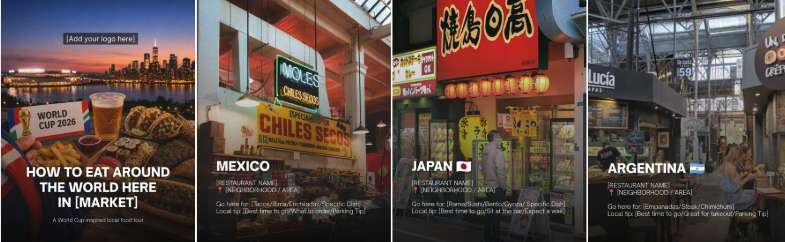
Customize the cover page by updating the [MARKET] placeholder with your city, area, or neighborhood so the post feels local and relevant. Add your agent or team logo in the logo placeholder on the cover if you want the post to feel more branded and polished.
-
On the following slides, feature local restaurants by cuisine. In this version, highlight one Mexican spot, one Japanese spot, and one Argentinean spot. For each slide, add the restaurant name, neighborhood or area, one short sentence about why it is worth visiting, what to order there, and one local tip. Keep the copy short, specific, and easy to skim. You can add more slides if you want to add more local shops and restaurants (optional).
-
On the following pages, you will notice there are different size options depending on how you want to use the template, whether you are posting it as a carousel, using it as a reel, or posting it on TikTok.
-
-
Download slides from Canva and upload to social.
-
Download the slides from your Canva template as a PNG or JPEG file.
-
Upload on Instagram, Facebook, LinkedIn, or wherever you are most active.
-
-
Copy and paste the CAPTION below (edit as needed!).
-
A few of my favorite international food here in [MARKET]. What did I miss?
-
-
Publish on social.
[Market] Affordability Report Card
🎯 How To
-
Go to Realtor.com’s 2026 State Affordability & Homebuilding Report Cards.
-
This works best if your state ranked favorably in the report – especially if it landed in the top 10, scored well on affordability, scored well on homebuilding, OR gives you a positive local angle to explain.
-
Look up your state and note:
Your state’s overall ranking
Affordability score
Homebuilding score
Median listing price
Any standout stat worth mentioning -
If your state is not top 10 but has a strong affordability or homebuilding stat, use that positive local angle instead to explain.
-
-
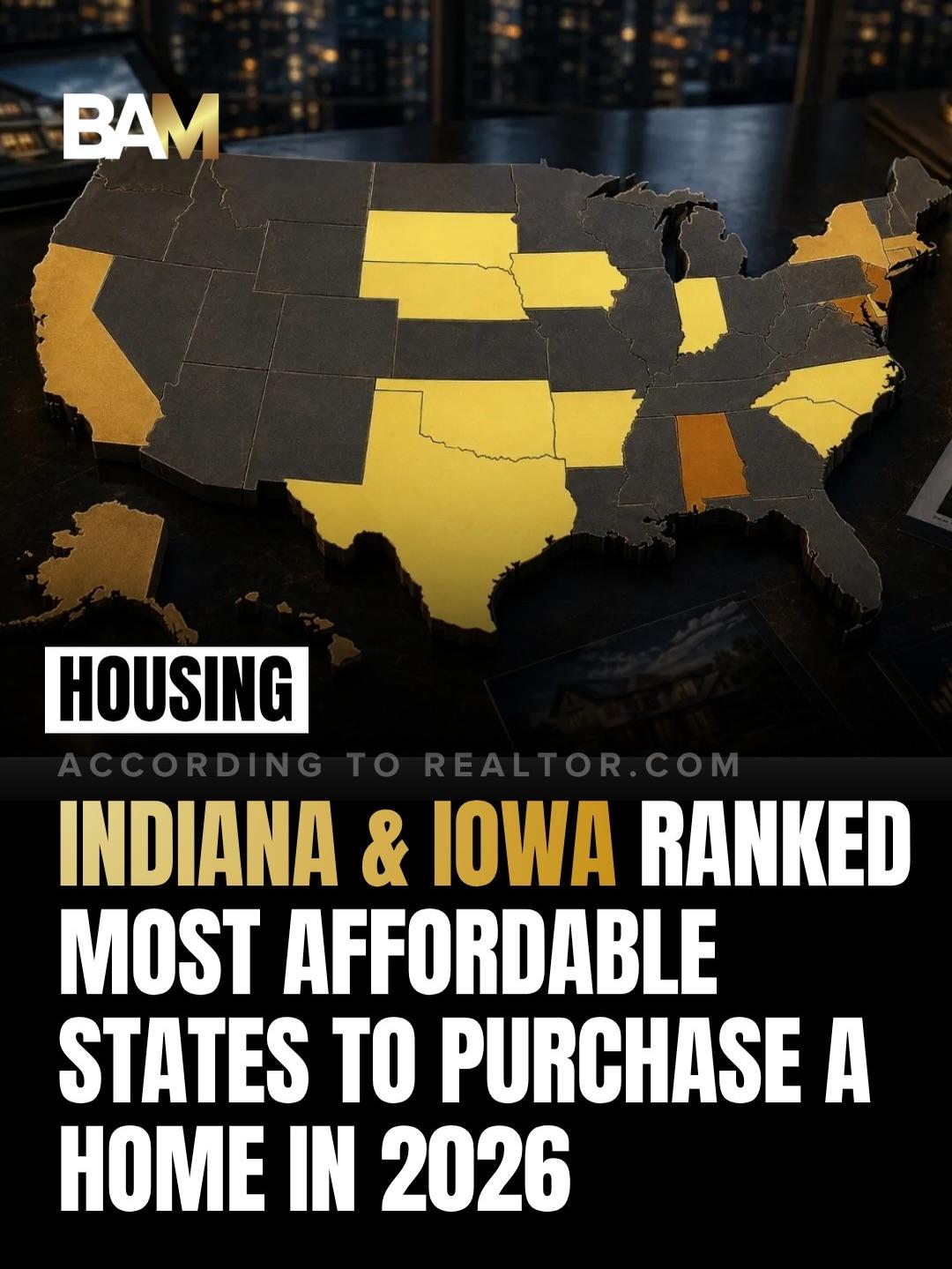
Screenshot or Green Screen the BAM Post
-
Use the BAM Instagram post as the visual behind you.
-
Best slides to green screen:
The cover slide if you want the broad affordability headline
The top 10 ranking slide if your state made the list
The least affordable slide if your state is not in the top 10 and you want to explain what that means locally
-
-
Name 3 Local Areas to Watch
-
Pick 3 neighborhoods, towns, zip codes, or price bands where affordability is stronger right now.
-
-
Publish on social.
Source: Realtor.com
Inspiration: @courtneywalshbaisa
Hyperlocal/Business Breaking News Template
By Krys Benyamein
🎯 How To
-
Open and Customize the template: Hyperlocal/Business Breaking News Template
-
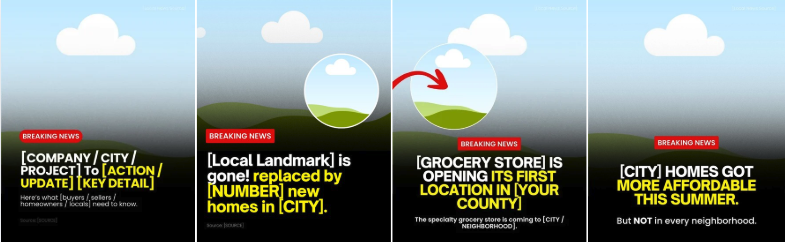
We have provided template options you can use, either for a new business opening in your local area or for a local development update.
-
Be sure to update all necessary placeholders like the [CITY], [NEIGHBORHOOD], [BUSINESS NAME], [SOURCE], [PROJECT NAME], and any other local details so the post feels accurate, relevant, and specific to your market.
-
For the visual, use a local image, storefront rendering, business logo if allowed, map screenshot, or a generic illustrated placeholder in the circle.
-
On the following pages, you will notice there are different size options depending on how you want to use the template, whether you are posting it as a carousel, using it as a reel, or posting it on TikTok.
-
-
Download slides from Canva and upload to social.
-
Download the slides from your Canva template as a PNG or JPEG file.
-
Upload on Instagram, Facebook, LinkedIn, or wherever you are most active.
-
-
Publish on social.
Listing Highlight: Multi-photo Collage Template
By Krys Benyamein

🎯 How To
-
Open and Customize the template: Listing Highlight: Multi-photo Collage Template
-
Customize the template and add your own photos, text, or design elements to match your brand and style.
-
Pro tip: Make sure the visual elements flow smoothly from one side to the next so the full carousel feels connected when people swipe.
-
-
Download slides from Canva and upload to social.
-
Download your final design from Canva as a high-quality PNG.
-
Open a new Canva file sized 1080 x 1350 px using the 4:5 ratio.
-
Go to the Apps section in Canva and search for: Image Splitter
-
Upload your long horizontal design into the Image Splitter app.
-
Split it into 7 slides.
Select: split into 7 vertical parts
-
Canva will generate each section as a separate image. Add each image to its own page in your new 1080 x 1350 file in the correct order.
-
Once everything looks right, download your carousel as a PNG or JPG file.
-
Upload on Instagram, Facebook, LinkedIn, or wherever you are most active.
-
-
Publish on social.
What’s Your Favorite Summer Tradition in [City]? (Reel)
![What’s your favorite summer tradition in [MARKET]_ - 06-19-26.gif](https://assets.skool.com/f/99bafab03f014d90b0792504967a8ea5/82f6149167ff4072ae4833c2d28e85d49f95195ecb0f4d428b2244526091d7dc.gif "What’s your favorite summer tradition in [MARKET]_ - 06-19-26.gif")
🎯 How To
-
Open and Customize the template: What’s Your Favorite Summer Tradition in [City]? (Reel)
-
Customize the template by updating the [MARKET] or [CITY] placeholders with your city, area, or neighborhood so the post feels local and personal.
-
On the following slides, fill in your own summer traditions using local spots and personal favorites. You can feature things like your go-to ice cream stop, Saturday mornings at the farmers market, a river or lake day, or any other summer ritual that feels true to your area. Swap in photos or clips of yours or the places so the post feels more personal, local, and real.
-
Use a fun or trending audio in Instagram when uploading to make the post feel more native and engaging.
-
-
Download slide from Canva and upload to social.
-
Download the slide from your Canva template as an MP4 video.
-
Upload on Instagram, Facebook, LinkedIn, or wherever you are most active.
-
-
Copy and paste the CAPTION below (edit as needed!).
-
My favorite summer tradition in [CITY] is [ADD HERE]. What’s yours?
-
-
Publish on social.
Video Scripts
📹 VIDEO SCRIPT 1: Father’s Day in [Market]
🎯 How To
-
Copy and paste the example video script below in your preferred working doc.
-
Edit as needed for your market and audience.
-
Record the video and post on social.
Hook:
Father’s Day is Sunday. Skip the tie. Skip the card.
Here are three spots in [CITY/TOWN NAME] your dad will actually want to go.
Body:
First stop, breakfast.
[BREAKFAST SPOT NAME, the classic diner everyone in town swears by].
[ONE SPECIFIC DETAIL, like pancakes that are to die for, all-day breakfast, or coffee they never let go empty].
That’s a dad’s perfect morning.
Next, [THE SPOT, like the local brewery, the golf course, the lookout point, or the classic burger joint].
[ONE SPECIFIC DETAIL, like a patio with the game on, a flight of local beers, or the best view in the county].
This is where he gets to actually relax. Good food. Somewhere to post up. Zero agenda.
And the third one: [DINNER SPOT, the steakhouse or BBQ joint that does the heavy lifting].
[ONE SPECIFIC DETAIL, like the bone-in ribeye, the brisket that sells out by six, or the patio that catches the sunset].
The food does all the talking here.
CTA:
Send this to whoever’s planning Father’s Day so the whole day’s already handled.
📹 VIDEO SCRIPT 2:
🎯 How To
-
Copy and paste the example video script below in your preferred working doc.
-
Edit as needed for your market and audience.
-
Record the video and post on social.
Source: Zillow
Hook:
Thinking about remodeling before you sell? That renovation could actually cost you more than it makes you.
Body:
A lot of sellers assume they need to update everything before listing. But Zillow analyzed over 2 million home sales and found something surprising.
Homes that were described as remodeled in listing descriptions sold for about 2% more than similar homes, while turnkey homes sold for about 3% more.
The problem? Most renovations cost way more than a 2-3% return.
What buyers really don’t want is a project. Homes described as fixer-uppers sold for 14% less.
So instead of spending $30,000 on a brand-new kitchen, focus on the things that make a home feel move-in ready. Fresh paint. Updated hardware. Fix the leaky faucet. Clean up the landscaping. Knock out the small stuff buyers notice immediately.
And if you already have premium features, make sure they’re highlighted. Zillow found things like quartzite countertops, custom built-ins, outdoor kitchens, and waterfront features can command some of the biggest premiums.
The goal isn’t making your house look brand new.
The goal is making buyers feel like they don’t have to do any work when they move in.
CTA:
Be honest: What’s the unfinished project in your house you’ve been meaning to tackle for years?
🎯 How To
-
Copy and paste the email script below in your preferred working doc.
-
Personalize the sign-off and send to renters and prospective buyers in your database.
Sources: Realtor.com, BAM
Subject: The sellers coming out ahead right now are doing this
Preview: It comes down to the first 30 days
Body of email:
Hi [First Name],
One of the biggest misconceptions I hear from homeowners is:
“If my home doesn’t sell right away, that’s okay. We can always adjust later.”
Sometimes that’s true.
But the reality is that the first few weeks on the market are often the most important.
A recent Realtor.com analysis found that homes that go under contract within the first four weeks sell for significantly more than comparable homes that sit longer. In fact, the strongest-performing listings are often under contract within the first two weeks.
Why?
It’s not luck.
Those homes typically have three things working in their favor:
-
Pricing that reflects today’s market, not last year’s market
-
Condition that matches buyer expectations
-
A launch strategy that creates strong interest from day one
When a home first hits the market, that’s when buyer attention is at its highest. It’s when listings get the most views, saves, showing requests, and conversations.
That’s why getting the strategy right upfront matters so much.
I know selling might not be on your radar right now, but if you’ve been thinking about it at all this year, what’s the one thing you’d be concerned about?
Best,
[Your Name]
Blog
🎯 How To
-
Copy and paste the blog below into your preferred working doc.
-
Replace everything in [BRACKETS] with your local info. Adjust the tone as needed to match your brand.
-
⬇️ Download the BLOG IMAGE HERE (3 options)
-
Upload to your website (meta description, keywords and title options included below).
Sources: Realtor.com, BAM
Meta Description: Realtor.com data shows homes that close at four weeks sell for 1.8% more than average. Here’s how to set your listing up for a strong first 30 days in [Your Market].
Keywords: listing strategy, home selling tips, days on market, price reduction, listing launch, [Your Market] real estate, how to price your home to sell, first 30 days on market, when to sell a home in [Your Market], listing price strategy
Title ideas:
-
Your Home’s First 30 Days on the Market Decide Everything
-
Sellers Who Get the First 30 Days Right Walk Away With More
-
Homes That Close in the First 4 Weeks Sell for More. Here’s Why.
Only about 41% of price cuts in Q1 2026 actually generated more showings.
That’s the number I want every seller in [Your Market] thinking about before they put their home on the market this summer.
A new report from Realtor.com shows that homes closing around the four-week mark sell for 1.8 percentage points above the monthly average for comparable homes, while homes that sit for 18 weeks close 1.3 points below it.
That means the first four weeks after listing your home are crucial to the outcome of your home sale. Here’s what those four weeks actually look like, and how to set your sale up right from day one.
What the Data Says About Timing
The Realtor.com report tracked sale-to-list price ratios across the full listing lifecycle. The longer a home sits, the more leverage shifts to buyers.
-
Homes closing at the four-week mark sell for 1.8 percentage points above the monthly average for comparable homes
-
Top performers in that group go under contract within the first two weeks
-
Homes sitting at 18 weeks close 1.3 points below the monthly average
-
More than 3 full percentage points separates the best and worst timing outcomes
Joel Berner, senior economist for Realtor.com, described what happens to overpriced homes:
“Price it right and buyers come to you. Price it wrong and you’re chasing them. Four weeks in, the market has already delivered its verdict: you’ve either got competing offers or you’re about to cut your price.”
[***Agent note: If you have local sale-to-list ratio data or average days on market for [Your Market], add it in here. A local stat will always land harder than a national one. ***]
Week by Week: What’s Happening with Your Listing
The first month on the market isn’t one long waiting period. Buyer activity follows a predictable pattern, and knowing what to expect at each stage helps you stay ahead of it.
Week 1
This is when buyer attention peaks. New listings get the most clicks, the most saves, and the most showing requests.
Serious buyers are actively watching for fresh inventory, and new listings rise to the top of their searches. Condition, photos, and price all get evaluated fast.
Week 2
The best-positioned homes are already under contract by now, especially when buyer demand is high. Buyers who toured in week one are making decisions.
If your home has had showings but no offers by the end of week two, that’s information to keep in mind.
Weeks 3 and 4
This is when the market renders its verdict. Sellers who priced correctly are closing deals.
Price reductions peak around week six in 2026, which means weeks three and four are still inside the window. But once you’re past week four without an offer, the options get narrower.
[*** Agent note: Add your local showing activity averages here if you have them, such as typical showings per week in the first 30 days or average days to first offer in [Your Market]. ***]
Why Price Cuts Don’t Always Fix the Problem
Only about 41% of Q1 2026 price reductions actually generated more showings. The majority didn’t produce a meaningful change in buyer activity.
A few reasons explain why:
-
A home that’s been sitting already carries stigma. Buyers wonder what other buyers found wrong with it.
-
A cut tells buyers the original price was off, which gives them more confidence to negotiate hard once they do show up.
-
The reduction often isn’t large enough to move the home into a new buyer pool, so it reaches the same people who already passed on it.
The goal going into a sale is to price in a way that makes the cut unnecessary. It’s a lot easier to have that conversation before you go live than six weeks in.
How to Set Up a Strong Launch in [Your Market]
Getting the first 30 days right comes down to price, condition, and timing.
Price
Your list price needs to reflect what buyers in [Your Market] are actually paying for comparable homes right now, not what sellers are asking.
Recent sold comps from the last 60 to 90 days tell you what the market is actually willing to pay. That’s the number to build from.
[*** Agents note: Include relevant data from your local market:
-
Median days on market in [Your Market]:
-
Median home sale price:
-
Percentage of [Your Market] homes with price reductions in May 2026: *** ]
Condition
Buyers have more choices than they did two or three years ago. Homes that show well get more showings and more serious offers.
Think clean, decluttered, well-photographed, and priced to match condition. A home that needs work and is priced like it doesn’t will sit.
Timing
Listing activity in [Your Market] follows seasonal patterns. Going live when buyer demand is strongest in your area gives you the best shot at that week-one attention surge.
[***Agent note: Add any local market-specific context here, such as
-
Which months generate the most buyer activity
-
How current inventory levels compare to last year
-
Any recent shifts in your local sale-to-list ratio. ***]
Your Launch Window
The first 30 days are the window where the outcome gets set.
If you’re thinking about selling in [Your Market], discuss the launch plan with your agent. Getting it right is a lot easier than trying to course correct after the fact.