
August is here. This week you’ve got a trending pop culture hook, a local bucket list to kick off the month, and some bold content plays that most agents won’t touch. Let’s get into it!
Or dive in below:
Social Media Templates
-
The Odyssey Trendjack
-
August Bucket List in [Market]
-
Hyperlocal/Business Breaking News Template
-
5 things worth the hype in [Market] OR 4 Spots in [City] That Are NOT Worth the Hype
-
Most agents won’t post this, but I will
-
Headline + Motion Template Listing
Video Scripts
-
5 Things Worth the Hype in [CITY/TOWN NAME]
-
The retro bedroom color that adds $2,277 to your home’s value
-
5 Numbers Sellers Should Watch
Blog
-
5 Housing Numbers Homeowners Should Watch
Social Media Templates
The Odyssey Trendjack (Static or Carousel)

🎯 How To
-
Open and Customize the template: The Odyssey Trendjack (Static or Carousel)
-
Customize the post with your listing photo, open house details, and the movie/TV screen edit.
-
The ChatGPT/AI prompt is in the notes section on each slide. Copy the prompt from the Canva notes, upload your listing photo to ChatGPT or your AI image tool, and use the prompt to make it look like The Odyssey is playing on the TV, projector, outdoor screen, or media wall in the home.
-
Use a listing photo that makes the joke work. This could be a living room with a TV, theater room, outdoor patio screen, fireplace TV, media room, or any space where it makes sense for a movie to be playing.
-
You can add more entries if you have multiple listing photos that work, or post it as a single post if you only want to feature one strong image.
-
On the following pages, you will notice there are different size options depending on how you want to use the template, whether you are posting it as a carousel, using it as a reel, or posting it on TikTok.
-
-
Download slides from Canva and upload to social.
-
Download the slides from your Canva template as a PNG or JPEG file.
-
Upload on Instagram, Facebook, LinkedIn, or wherever you are most active.
-
-
Copy and paste the CAPTION below (edit as needed!).
-
Come see the home, the screen, and whether this room is actually worthy of a Christopher Nolan runtime.
-
-
Publish on social.
August Bucket List in [Market] (Carousel)

🎯 How To
-
Open and Customize the template: August Bucket List in [Market] (Carousel)
-
Customize the cover page by replacing [Market] with your city, town, neighborhood, or local area. Add your logo, name, or social handle.
-
On the following slides, update each bucket list item with local recommendations and hot spots in your area. Swap the photos to match each activity so the carousel feels specific to your market, not generic.
-
If you would like to stay updated on local happenings around your market or area and add more ideas to the bucket list, BAMx members can use the Hyperlocal Content AI tool at hyperlocalcontent.ai. Try it today to find local events, new spots, community updates, and other market-specific ideas worth sharing.
-
On the following pages, you will notice there are different size options depending on how you want to use the template, whether you are posting it as a carousel, using it as a reel, or posting it on TikTok.
-
-
Download slides from Canva and upload to social.
-
Download the slides from your Canva template as a PNG or JPEG file.
-
Upload on Instagram, Facebook, LinkedIn, or wherever you are most active.
-
-
Publish on social.
Hyperlocal/Business Breaking News Template (Static Post)
🎯 How To
-
Open and Customize the template: Hyperlocal/Business Breaking News Template
-
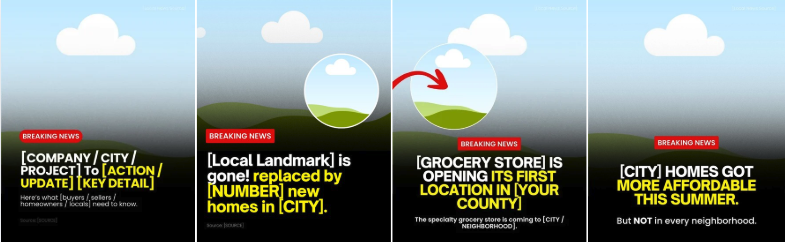
We have provided template options you can use, either for a new business opening in your local area or for a local development update.
-
Be sure to update all necessary placeholders like the [CITY], [NEIGHBORHOOD], [BUSINESS NAME], [SOURCE], [PROJECT NAME], and any other local details so the post feels accurate, relevant, and specific to your market.
-
For the visual, use a local image, storefront rendering, business logo if allowed, map screenshot, or a generic illustrated placeholder in the circle.
-
If you’re not sure what local updates to feature, BAMx members can use Hyperlocal Content AI Tool at hyperlocalcontent.ai to find local projects, new stores opening, development updates, and other market-specific stories worth posting about. Try it while customizing this template so you’re not guessing what to share.
-
On the following pages, you will notice there are different size options depending on how you want to use the template, whether you are posting it as a carousel, using it as a reel, or posting it on TikTok.
-
-
Download slides from Canva and upload to social.
-
Download the slides from your Canva template as a PNG or JPEG file.
-
Upload on Instagram, Facebook, LinkedIn, or wherever you are most active.
-
-
Publish on social.
5 things worth the hype in [Market] (Carousel)

🎯 How To
-
Open and Customize the template: 5 things worth the hype in [Market] (Carousel)
-
Customize the cover page by replacing [City] with your city, town, neighborhood, or local market. Add your logo and handle/username in the placeholders so the post feels branded and connected to you.
-
Pick places you would actually recommend, not just the most obvious spots everyone already knows. You can also add a short note if the design allows, like your favorite order, best day to go, or why it is worth the hype.
-
On the following pages, you will notice there are different size options depending on how you want to use the template, whether you are posting it as a carousel, using it as a reel, or posting it on TikTok.
-
-
Download slides from Canva and upload to social.
-
Download the slides from your Canva template as a PNG or JPEG file.
-
Upload on Instagram, Facebook, LinkedIn, or wherever you are most active.
-
-
Copy and paste the CAPTION below (edit as needed!).
-
I’ve done the research for you (meaning I’ve been to all of these places multiple times).
[Go into why each one is worth it.]
-
-
Publish on social.
OR
4 Spots in [City] That Are NOT Worth the Hype (Carousel)

🎯 How To
-
Open and Customize the template: 4 Spots in [City] That Are NOT Worth the Hype (Carousel)
-
Customize the cover page by replacing [City] with your city, town, neighborhood, or local market. Add your logo and handle/username in the placeholders so the post feels branded and connected to you.
-
Use a bold text-only graphic, city background, local photo collage, or blurred local imagery. Keep it fun, not mean. The goal is to start a local conversation, not burn down every relationship you have in town.
-
On the following pages, you will notice there are different size options depending on how you want to use the template, whether you are posting it as a carousel, using it as a reel, or posting it on TikTok.
-
-
Download slides from Canva and upload to social.
-
Download the slides from your Canva template as a PNG or JPEG file.
-
Upload on Instagram, Facebook, LinkedIn, or wherever you are most active.
-
-
Copy and paste the CAPTION below (edit as needed!).
-
You may not agree, but I think these places are a little overrated. Here’s why..
[Go into why each one.]
-
-
Publish on social.
Most agents won’t post this, but I will (Static Post)

🎯 How To
-
Open and Customize the template: Most agents won’t post this, but I will (Static Post)
-
Customize the tweet-style post with your own name, username, and photo so it looks like a real tweet-style post coming from you.
-
Update the body copy with the market topic you want to talk about. You can keep the mortgage rate example or swap it for another topic like inventory, price reductions, buyer hesitation, affordability, seller expectations, or local market shifts.
-
On the following pages, you will notice there are different size options depending on how you want to use the template, whether you are posting it as a carousel, using it as a reel, or posting it on TikTok.
-
-
Download slides from Canva and upload to social.
-
Download the slides from your Canva template as a PNG or JPEG file.
-
Upload on Instagram, Facebook, LinkedIn, or wherever you are most active.
-
-
Copy and paste the CAPTION below (edit as needed!).
-
Remember when everyone said, “Date the rate. Marry the house”?
The truth is… none of us know where rates are headed.
The market has its own timeline.
Your life has yours.
-
-
Publish on social.
Headline + Motion Template Listing (Carousel)

🎯 How To
-
Open and Customize the template: Headline + Motion Template Listing (Carousel)
-
Customize the cover page by swapping in a short clip of the property and adding your headshot or another area of the home you want to highlight. If you do not have a video clip, you can also use a still image of the property, whether that is the exterior or another standout area you want to feature on the cover.
-
On the cover page, add your own headline that creates a strong hook. This could be a new listing, new construction, open house, or another attention-grabbing property headline that fits the post.
-
On the following slides, swap in more property photos you want to highlight. Focus on the spaces that will help tell the story of the home, like the living room, kitchen, bedroom, backyard, or other standout features. For the last slide, add a neighborhood area nearby or another location-based feature worth highlighting so the post feels more complete and lifestyle-driven.
-
On the following pages, you will notice there are different size options depending on how you want to use the template, whether you are posting it as a carousel, using it as a reel, or posting it on TikTok.
-
-
Download slides from Canva and upload to social.
-
Download the slides from your Canva template as a PNG or JPEG file.
-
Upload on Instagram, Facebook, LinkedIn, or wherever you are most active.
-
-
Publish on social.
Video Scripts
📹 VIDEO SCRIPT 1: 5 Things Worth the Hype in [CITY/TOWN NAME]
🎯 How To
-
Copy and paste the example video script below in your preferred working doc.
-
Edit everything in [BRACKETS] for your market and audience.
-
Record the video and post on social.
HOOK:
Five things in [CITY/TOWN NAME] that people will not shut up about. And after living here, I can tell you which ones actually deliver.
BODY:
Number one, the one everybody sends visitors to.
[THE FAMOUS SPOT, your landmark, park, or main drag]
[ONE SPECIFIC DETAIL, e.g. go on a weekday morning and you’ll have it to yourself]
Touristy? A little. Still worth it? Absolutely.
Number two, the food thing.
[THE FOOD ITEM OR RESTAURANT, the one that gets tagged constantly]
[ONE SPECIFIC DETAIL, e.g. there’s a line out the door by eleven and nobody minds]
I’ve had it more times than I’ll admit publicly.
Number three, the thing that only happens a few times a year.
[THE EVENT OR TRADITION, your festival, market, or seasonal thing]
[ONE SPECIFIC DETAIL, e.g. the whole town shows up and it feels like everyone knows everyone]
This is the one people move away and miss.
Number four, the one you have to work for.
[THE SPOT WITH THE WAIT, the trail, the reservation, the sold-out thing]
[ONE SPECIFIC DETAIL, e.g. yes it’s a hassle, and yes I’d do it again this weekend]
Some things are popular for a reason.
And number five.
This is the one I held out on the longest.
[YOUR PERSONAL PICK, the thing you resisted and finally caved on]
[ONE HONEST MOMENT, e.g. I spent two years telling people it was overrated, and I was wrong]
That’s the thing about living here.
Eventually the town wins you over.
CTA:
Tell me what I left off. If it’s actually worth the hype, I’ll say so.
📹 VIDEO SCRIPT 2: The retro bedroom color that adds $2,277 to your home’s value
Source: Zillow
🎯 How To
-
Copy and paste the example video script below in your preferred working doc.
-
Edit as needed for your market and audience.
-
Record the video and post on social.
HOOK:
One bedroom paint color could add $2,277 to a buyer’s offer, and it isn’t what you think.
BODY:
Zillow’s 2026 paint analysis found that a chocolate-brown bedroom was associated with offers $2,277 higher than a white bedroom.
Honestly? This one surprised me
If chocolate brown feels aggressive, sage green was the only color that performed near the top in every room. It feels warmer than white, but it is still neutral enough for most buyers.
Here’s the part nobody talks about: the wrong color can create the opposite reaction. Ochre yellow throughout the home was associated with offers than came in more than $18,000 lower than white. Paint will not rescue bad pricing, but it absolutely changes a buyer’s first emotional reaction.
And remember, before repainting, check the color in daylight and in low lighting, not just on a sample card.
CTA:
Send this to someone picking out paint colors.
🎯 How To
-
Copy and paste the email script below in your preferred working doc.
-
Edit as needed for your market.
-
Be prepared to share local market data with anyone who responds.
-
Personalize the sign-off and send to prospective sellers in your database.
Subject: 5 numbers that answer your biggest questions about selling
Body of email:
Hey [First Name],
When a home sits on the market, or a seller loses money, it’s usually for the same reason.
Not because of a bad agent. Not because of bad luck. Because they made a decision without the right information.
Five numbers change that:
-
Inventory
-
Days on market
-
Price reductions
-
Months of supply
-
Mortgage rates
Together, this data gives insight into who holds the power in a negotiation, how buyers are behaving, and what that means for your home in.
I track all five regularly.
If you want, I’ll pull the current numbers for your neighborhood and send you a quick breakdown. No report to scroll through. Just the five numbers, what they mean, and what I’m seeing right now in [Your Market].
Reply with your neighborhood, and I’ll put it together for you. Takes me about 10 minutes.
Best,
[Your Name]
Blog
🎯 How To
-
Copy and paste the blog below into your preferred working doc.
-
Replace everything in [BRACKETS] with your local info. Adjust the tone as needed to match your brand.
-
⬇️ Download the BLOG IMAGE HERE (3 options)
-
Upload to your website (meta description, keywords and title options included below).
Meta Description: Real estate headlines say “the market is good” but that doesn’t tell homeowners anything useful. Here are the 5 numbers that actually do, and how to read them in [Your Market].
Keywords: housing market indicators, home inventory, days on market, price reductions, months of supply, mortgage rates, [Your Market] real estate, is it a good time to sell, home values 2026, housing market numbers,
Title ideas:
-
The 5 Housing Numbers Every Homeowner Should Watch
-
Forget “The Market Is Good.” Here’s What These 5 Numbers Actually Tell You
-
Thinking of Selling? These 5 Numbers Tell You More Than Any Headline Will
Most homeowners don’t need to know everything about the housing market. They just want answers to questions like:
-
If I listed today, would my home sell quickly?
-
Would buyers expect me to negotiate?
-
Are prices still holding up in my neighborhood?
-
Should I wait until next year?
The good news is you don’t need to watch the market every day to answer those questions.
Five local metrics tell most of the story. Together, they reveal how competitive the market is, how buyers are behaving, and what that means for homeowners in [Your Market].
Here are the five data points I track regularly, and why each matters.
1. Inventory: What’s for Sale Near You
Inventory is the total number of homes for sale in your area right now.
That one number tells you who holds the power in a negotiation.
Low inventory means fewer choices for buyers, which means more competition for your home if you list. High inventory means buyers have options, and you have to work harder to stand out.
So, here’s the question you need a clear answer to:
Is inventory in your neighborhood going up, down, or holding steady compared to last year?
If it’s rising, pricing strategy starts to matter more, because buyers have more to compare your home against. If it’s falling, the window to sell with less competition may be shorter than it looks.
Here’s what I’m seeing in [Your Market]:
-
Single-family homes for sale: [# of Single-Family Homes for Sale in Your Market]
-
Compared to one year ago: [# Compared to One Year Ago]
2. Days on Market: How Fast Homes Are Actually Selling
Days on market measures how long homes sit before going under contract. Think of it as the market’s report card on pricing.
A home that sits too long starts to carry a stigma. Buyers wonder what’s wrong with it. The longer it sits, the more leverage shifts to the buyer’s side of the table.
Here’s the question to ask:
Are homes in your price range and neighborhood selling in days, or in weeks?
If days on market is climbing, the market is telling sellers something about price. If it’s short, well-priced homes are still moving quickly. Knowing which category your home falls into before you list changes how you should approach pricing from day one.
Here’s what I’m seeing in [Your Market]:
-
Days on Market: [# of Median or Average DOM for SF Homes in Your Market]
-
Compared to one year ago: [# Compared to One Year Ago]
3. Price Reductions: What Buyers Are Pushing Back On
This is the percentage of active listings that have dropped their asking price at least once. It’s a lagging indicator, meaning it tells you what already happened to homes listed for sale.
A high rate of price reductions in your area means buyers are pushing back, and aspirational pricing is getting punished.
So, here’s the question:
What percentage of homes in your zip code have had a price cut in the last 30 days?
A rising number means the market is correcting itself, and the right response is pricing accurately from day one. Homes priced correctly from the start tend to sell well and sell fast. Homes that get chased down in price usually take longer and net less in the end.
Here’s what I’m seeing in [Your Market]:
-
Percentage of Single-Family Homes for Sale with Price Reductions: [% of Single-Family Homes for Sale with Recent Price Reductions in Your Market)
-
Compared to one year ago: [# Compared to One Year Ago]
4. Months of Supply: The Number That Tells You Whose Market It Is
Months of supply measures how long it would take to sell every home currently on the market if no new listings came on. It’s the clearest single signal of market balance available.
-
Under 3 months: seller’s market
-
3 to 6 months: balanced market
-
Over 6 months: buyer’s market
Here’s what you need to know:
Where does your local market sit right now, and which direction is it trending?
This number can move quickly. A market that sat at 1.8 months of supply a couple years ago and now sits at 4.2 months has fundamentally changed. Homeowners who understand that movement price and time their move accordingly.
The ones who don’t are often the ones taking price cuts later.
Here’s what I’m seeing in [Your Market]:
-
Months of Supply: [# of Months of Supply of SF Homes for Sale in Your Market]
-
Compared to one year ago: [# Compared to One Year Ago]
5. Mortgage Rates: The Number That Affects You Too
Mortgage rates affect sellers just as much as buyers. Every point rates move changes how many qualified buyers can afford your home at your target price.
A buyer who could afford your home at 6.5% may not qualify at 7.5%. That directly affects your pool of potential buyers before your home even hits the market.
Here’s the question that demands a clear answer:
At today’s rate, how many buyers in your market can realistically afford a home at your price point?
Rates also affect your next move. If you have a 3% rate locked in, deciding to sell isn’t just about what your home is worth. It’s about what payment you’d be moving into. That math is worth walking through with real numbers before you decide anything.
As of now, the weekly average rate for a 30-year mortgage sits at 6.58%, up from the previous week’s average rate of 6.55% but down from 6.72% roughly one year ago.
Understanding these five numbers and where they stand in [Your Market] empowers you to act with confidence when they indicate you’re in a good position to sell.